AI-Powered Apps, Automation & Content Creation for Businesses
Helping businesses leverage AI, automation, and integrations to streamline workflows and supercharge content creation.
The future of business is AI-driven. I specialize in creating AI-powered solutions that automate processes, integrate seamlessly with your existing tools, and generate content effortlessly. Whether it's WhatsApp and Telegram automation, AI voice agents, or AI-generated videos and images, I help businesses stay ahead of the curve. Let's explore how AI can work for you.

About Me
With over 25 years of experience in IT consulting and over 15 years in photography and videography, I've always been at the forefront of technology and creativity. My journey from visual storytelling to AI innovation has given me a unique perspective on how automation, AI integrations, and content generation can revolutionize businesses.
I now focus on:
- •Developing AI-powered mobile apps
- •Automating workflows with WhatsApp, Telegram, and CRM integrations
- •Creating AI-generated content for businesses, including video and image automation
- •Leveraging local LLMs for secure and powerful AI solutions
Businesses today need to embrace AI to stay competitive. Let's connect and explore how AI can transform your operations.
Services
AI-Powered Mobile Apps
Custom-built AI applications that streamline operations, enhance efficiency, and provide innovative solutions tailored to your business needs.
Automations & Integrations
Seamlessly integrate AI into your business operations with WhatsApp, Telegram, email marketing, and CRM automation.
In production: n8n pipelines for lead capture & content flows
Voice AI Agents
Enhance customer interactions with AI-driven voice agents, providing automated responses and intelligent customer support.
Local LLM Solutions
AI chatbots and tools that run locally, ensuring privacy, security, and speed for businesses needing on-premise AI.
AI-Powered Content Generation
Revolutionize social media and marketing with AI-generated videos, images, and automated content creation.
In production: AI-generated songs, exercises & visuals in Hola Calle →
Current Work & Projects
AI-powered apps and automations I'm building today - like the Hola Calle language-learning app.
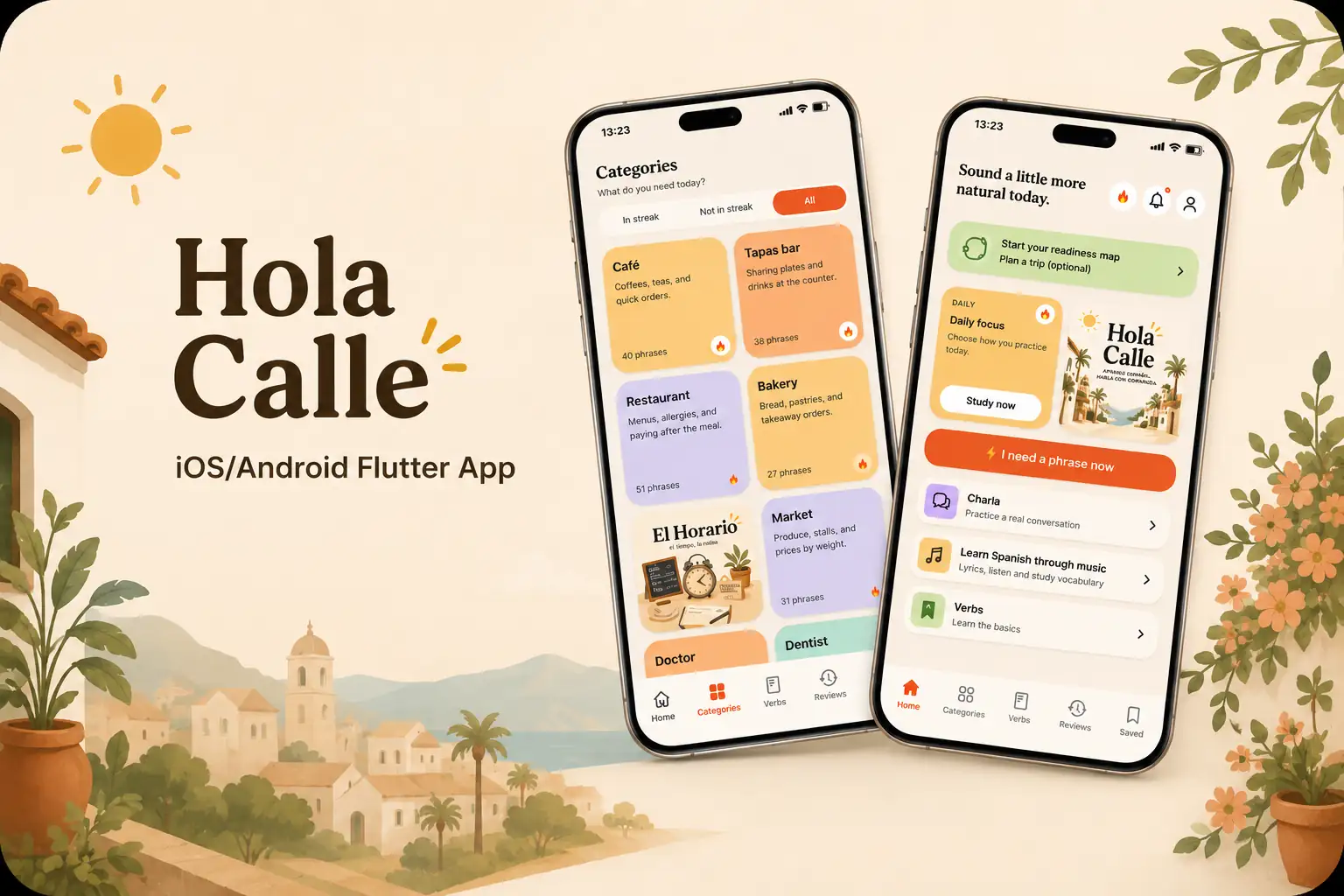
Hola Calle : AI-Powered Language App
A Spanish-learning app for iOS & Android built around real street Spanish: AI conversation practice, speech exercises, learning through music and trip-readiness tracking.

Hola Hiszpania : Spanish-Learning Brand
The brand and content platform behind Hola Calle: e-book, blog and community for learning practical Spanish and living in Spain.
Past Work / Portfolio
15 years of photography and videography - the visual foundation behind my content work today.


This site is the proof.
Designed, written and shipped with the same AI workflows I build for clients - and it scores a perfect 100% on Google PageSpeed Insights, on both mobile and desktop.
Why that matters
Fast pages, flawless on any device, no glitches - the experience your customers get is the same standard I hold my own work to. If AI can build this, imagine what it can do for your business.

Latest AI News
Seedance 2.0 Explained: A New Level of Realism in AI Video Generation
Apr 10, 2026
Seedance 2.0 has just been released, and it feels like a real step forward in how AI video is perceived and used. For the first time, the output does not immediately signal that it was generated by AI. Instead, it feels closer to actual video production, which changes how creators and teams can use it in practice. <br><br> <ul> <li><a href="#overview">What Seedance 2.0 is and why it matters</a></li> <li><a href="#visual-quality">From artificial look to cinematic feel</a></li> <li><a href="#intent">Better understanding of creative intent</a></li> <li><a href="#consistency">Improved consistency across frames</a></li> <li><a href="#workflow">Faster idea to video workflows</a></li> <li><a href="#use-cases">Real use cases for creators and teams</a></li> <li><a href="#industry">What this means for the video creation industry</a></li> <li><a href="#limitations">Current limitations and realistic expectations</a></li> <li><a href="#conclusion">Why this release is a turning point</a></li> </ul> <h2 id="overview">What Seedance 2.0 is and why it matters</h2> <p>Seedance 2.0 is a new version of a video generation model that focuses on improving realism, consistency, and usability.</p> <p>While earlier tools made it possible to generate video, they often required heavy prompt tuning and still produced results that felt artificial.</p> <p>This update shifts the experience from experimentation toward practical usage.</p> <p>The key difference is not just better output, but a smoother path from idea to usable content.</p> <br><br> <h2 id="visual-quality">From artificial look to cinematic feel</h2> <p>One of the most noticeable improvements is visual quality.</p> <p>Previous AI video tools often had a recognizable look. Lighting felt off, motion looked unnatural, and scenes lacked depth.</p> <p>With Seedance 2.0, several elements feel more aligned with real video production:</p> <ul> <li>Lighting behaves more naturally</li> <li>Movement feels smoother and more realistic</li> <li>Scenes have a stronger sense of depth</li> </ul> <p>This reduces the gap between generated content and filmed content.</p> <p>Instead of asking whether something is AI generated, viewers are more likely to focus on the scene itself.</p> <br><br> <h2 id="intent">Better understanding of creative intent</h2> <p>Another important improvement is how the model interprets prompts.</p> <p>Earlier systems often required detailed and precise instructions to produce acceptable results.</p> <p>Seedance 2.0 reduces that effort.</p> <p>A simpler description of a scene is more likely to produce a usable output on the first attempt.</p> <p>This changes how creators interact with the tool.</p> <p>Instead of spending time refining prompts, they can focus more on the idea they want to express.</p> <br><br> <h2 id="consistency">Improved consistency across frames</h2> <p>One of the biggest challenges in AI video generation has been consistency.</p> <p>Common issues include:</p> <ul> <li>Characters changing appearance between frames</li> <li>Objects shifting unexpectedly</li> <li>Scenes losing continuity</li> </ul> <p>Seedance 2.0 shows clear progress in this area.</p> <p>The model appears to treat a sequence as a continuous scene rather than a collection of individual images.</p> <p>This leads to more stable results and reduces the need for manual correction.</p> <br><br> <h2 id="workflow">Faster idea to video workflows</h2> <p>These improvements have a direct impact on workflow speed.</p> <p>Creators can move from concept to usable video more quickly because:</p> <ul> <li>Fewer iterations are needed</li> <li>Outputs require less fixing</li> <li>Results are closer to expectations from the start</li> </ul> <p>This keeps the creative process in motion.</p> <p>Maintaining flow is often more valuable than achieving perfect output on the first try.</p> <p>Seedance 2.0 supports that by reducing friction during creation.</p> <br><br> <h2 id="use-cases">Real use cases for creators and teams</h2> <p>The improvements make the tool more relevant for actual production workflows.</p> <p><strong>Content creation</strong></p> <p>Creators can generate short videos, test visual ideas, and produce variations without needing full production resources.</p> <p><strong>Marketing and campaigns</strong></p> <p>Teams can quickly create visual concepts and iterate on messaging before investing in final production.</p> <p><strong>Storyboarding</strong></p> <p>Scenes can be visualized in motion, helping teams align on direction earlier in the process.</p> <p><strong>Prototyping</strong></p> <p>Ideas can be turned into visual drafts that communicate intent more clearly than static images.</p> <p>These use cases show where AI video tools are starting to move from experimentation into practical application.</p> <br><br> <h2 id="industry">What this means for the video creation industry</h2> <p>The broader impact is on how video content is produced.</p> <p>When tools become easier to use and outputs become more reliable, the barrier to entry decreases.</p> <p>This leads to several changes:</p> <ul> <li>More creators can produce video content</li> <li>Teams can test more ideas in less time</li> <li>Production workflows become more iterative</li> </ul> <p>This does not replace traditional production, but it adds a new layer to the process.</p> <p>AI becomes part of the early stages of creation and experimentation.</p> <br><br> <h2 id="limitations">Current limitations and realistic expectations</h2> <p>Despite the progress, the technology is not without limitations.</p> <ul> <li>Complex scenes may still require multiple attempts</li> <li>Longer sequences can introduce inconsistencies</li> <li>Final outputs may still benefit from editing</li> </ul> <p>The tool is best seen as an accelerator rather than a full replacement for professional production workflows.</p> <p>Understanding where it fits is key to using it effectively.</p> <br><br> <h2 id="conclusion">Why this release is a turning point</h2> <p>Seedance 2.0 represents a shift in perception.</p> <p>AI video is moving from something that feels experimental to something that can be integrated into real workflows.</p> <p>The combination of better quality, improved consistency, and easier interaction makes the technology more practical.</p> <p>This is what turns a tool into something that creators and teams can rely on.</p> <p>It may not be perfect, but it sets a new baseline for what people expect from AI video generation.</p>
Cursor 3 Explained: The Future of AI Coding and Agent Workflows
Apr 7, 2026
Cursor 3 just launched and it feels like more than a typical version update. The core capabilities are familiar, but the experience of building with AI agents has clearly shifted. What stands out is not just what Cursor can do, but how it changes the way developers interact with code, tools, and workflows. <br><br> <ul> <li><a href="#overview">What changed in Cursor 3</a></li> <li><a href="#ui">A redesigned interface built for flow</a></li> <li><a href="#browser">Browser inside the IDE and why it matters</a></li> <li><a href="#multi-agent">Multi agent workflows that actually work</a></li> <li><a href="#git">Integrated Git and development workflow</a></li> <li><a href="#comparison">Cursor versus other AI coding tools</a></li> <li><a href="#workflow-shift">The shift from coding to orchestrating</a></li> <li><a href="#teams">What this means for teams and developers</a></li> <li><a href="#limitations">Limitations and trade offs</a></li> <li><a href="#conclusion">Why this update matters</a></li> </ul> <h2 id="overview">What changed in Cursor 3</h2> <p>Cursor 3 introduces a set of improvements that focus less on raw capability and more on usability.</p> <p>The underlying idea is simple. Developers are no longer just writing code. They are working alongside AI agents that generate, review, and modify that code.</p> <p>To support that, the environment itself needs to evolve.</p> <p>Cursor 3 is designed to make agent driven development easier to manage, easier to understand, and easier to scale across multiple workflows.</p> <br><br> <h2 id="ui">A redesigned interface built for flow</h2> <p>The first noticeable change is the interface.</p> <p>The layout feels calmer and more structured, which matters when working with multiple processes at the same time.</p> <p>Several improvements stand out:</p> <ul> <li>Terminals are separated into their own dedicated space</li> <li>Agents are clearly grouped by project</li> <li>There is better visibility into what is happening inside the codebase</li> </ul> <p>This reduces cognitive load.</p> <p>When developers work with several agents, multiple files, and ongoing tasks, clarity becomes more important than raw features.</p> <p>The updated interface supports that by making activity easier to track.</p> <br><br> <h2 id="browser">Browser inside the IDE and why it matters</h2> <p>One of the most practical additions is the ability to interact with a live browser directly inside the development environment.</p> <p>This allows developers to open a website, select an element, and request changes.</p> <p>For example:</p> <ul> <li>Adjust layout spacing</li> <li>Fix alignment issues</li> <li>Simplify components</li> </ul> <p>The key advantage is context.</p> <p>Instead of describing a problem abstractly, developers can point to it directly.</p> <p>The system understands what is being referenced and updates the code accordingly.</p> <p>This shortens the feedback loop between seeing an issue and fixing it.</p> <br><br> <h2 id="multi-agent">Multi agent workflows that actually work</h2> <p>Cursor 3 makes it easier to run multiple agents at the same time.</p> <p>More importantly, it makes those workflows visible and manageable.</p> <p>Developers can assign different roles to different agents, such as:</p> <ul> <li>Security analysis</li> <li>Code review</li> <li>Refactoring suggestions</li> </ul> <p>These processes can run in parallel, and their outputs can be monitored in real time.</p> <p>This changes the role of the developer.</p> <p>Instead of handling each task manually, the developer coordinates a set of agents that each handle part of the workflow.</p> <p>This approach scales better as projects grow in complexity.</p> <br><br> <h2 id="git">Integrated Git and development workflow</h2> <p>Cursor 3 also brings version control actions directly into the environment.</p> <p>Developers can create branches, commit changes, push updates, and open pull requests without leaving the editor.</p> <p>While this may seem like a small feature, it has a real impact on workflow efficiency.</p> <p>Reducing context switching helps maintain focus and keeps the development process smoother.</p> <p>When combined with agent workflows, this integration allows changes to move from generation to review to deployment more quickly.</p> <br><br> <h2 id="comparison">Cursor versus other AI coding tools</h2> <p>Cursor operates in a growing landscape of AI coding tools.</p> <p>Each tool has different strengths.</p> <p>Cursor focuses on experience and orchestration.</p> <p>Other tools may focus more on raw model access or cost efficiency.</p> <p>This leads to a practical trade off.</p> <p>Cursor provides a structured and visual environment for managing workflows, while other tools may offer more direct access to models at a lower cost.</p> <p>The best choice depends on how a developer prefers to work.</p> <br><br> <h2 id="workflow-shift">The shift from coding to orchestrating</h2> <p>The most important change is not a specific feature.</p> <p>It is a shift in how development work is approached.</p> <p>Instead of writing every line of code manually, developers are increasingly directing agents.</p> <p>This involves:</p> <ul> <li>Defining tasks</li> <li>Assigning responsibilities</li> <li>Reviewing outputs</li> <li>Guiding improvements</li> </ul> <p>Cursor 3 supports this model by making agent activity visible and controllable.</p> <p>The developer becomes a coordinator rather than a sole executor.</p> <br><br> <h2 id="teams">What this means for teams and developers</h2> <p>For teams, the implications are practical.</p> <p><strong>Better collaboration</strong></p> <p>Clear visibility into agent activity helps teams understand what is happening across a project.</p> <p><strong>Faster iteration</strong></p> <p>Parallel workflows allow multiple tasks to be handled at once.</p> <p><strong>Improved focus</strong></p> <p>Integrated tools reduce the need to switch between different environments.</p> <p>Developers can spend more time guiding the system and less time managing tools.</p> <br><br> <h2 id="limitations">Limitations and trade offs</h2> <p>Despite the improvements, there are still considerations to keep in mind.</p> <ul> <li>Dependence on external APIs can affect cost and usage limits</li> <li>Agent outputs still require review and validation</li> <li>Complex systems may need additional structure beyond what the tool provides</li> </ul> <p>Cursor improves the experience, but it does not remove the need for careful development practices.</p> <br><br> <h2 id="conclusion">Why this update matters</h2> <p>Cursor 3 is important because it reflects a broader transition.</p> <p>Development is moving from writing code line by line to managing systems that generate and modify code.</p> <p>The tools that support this shift will define how developers work in the coming years.</p> <p>Cursor 3 does not change everything about development, but it changes how it feels to build.</p> <p>And that shift in experience often drives adoption faster than new features alone.</p>
Get in Touch
Want to explore how AI can work for you? Reach out today!